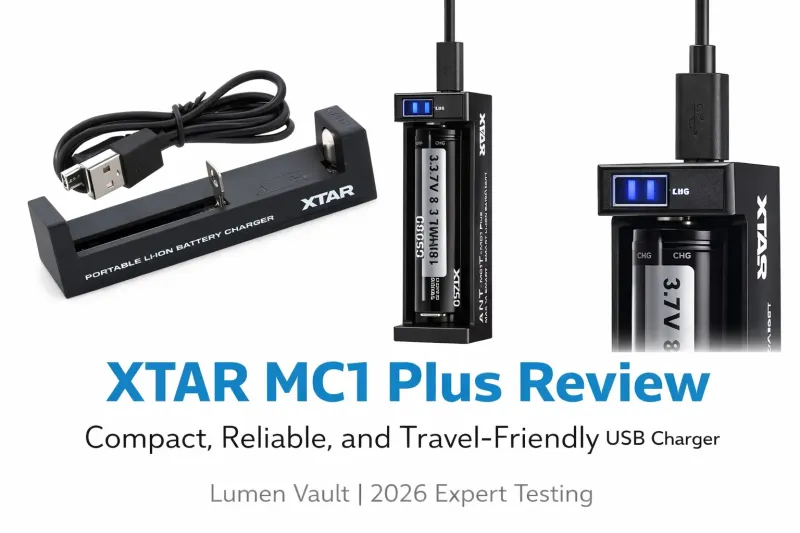
XTAR MC1 Plus Review: Is This Compact Lithium Battery Charger Worth Buying in Kenya?
The XTAR MC1 Plus is a compact, single-slot USB charger designed for rechargeable 3.6V and 3.7V lithium-ion batteries. Its small size, simple operation and automatic charging current selection make it an option for flashlight owners, security professionals and anyone who needs a portable battery charger.
But with several XTAR chargers available, is the MC1 Plus the right choice for your needs? In this review, we look at its design, battery compatibility, charging performance, safety features, advantages and limitations to help you decide.

If you are shopping for rechargeable batteries for your flashlight or other equipment, our 18650 battery buying guide for Kenya is a useful place to start.
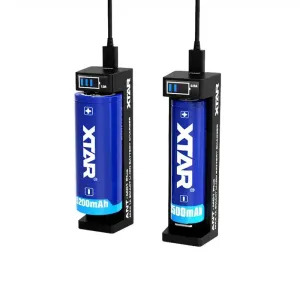
XTAR MC1 Plus: Key Specifications
| Specification | Details |
|---|---|
| Battery type | 3.6V/3.7V lithium-ion |
| Charging current | 500mA / 1A, automatic selection |
| Input | USB 5V / 1A |
| Charging slots | 1 |
| Weight | Approximately 25g |
| Dimensions | 92 × 22 × 26mm |
| Charging indicator | LED status light |
| Editor's rating | 4.5/5 |
Design and Build Quality
One of the biggest advantages of the XTAR MC1 Plus is its compact design. Measuring just 92 × 22 × 26mm and weighing approximately 25g, it is easy to carry in a backpack, equipment bag or drawer without taking up much space.
The charger has a single battery slot, a micro-USB input and an LED indicator that shows the charging status. Its straightforward layout means you do not need to navigate complicated settings or menus before charging a battery.
The adjustable battery contacts accommodate several common cylindrical lithium-ion battery sizes. This makes the MC1 Plus useful for people who own different devices that use rechargeable cells, particularly flashlights and other portable equipment.
One limitation is the micro-USB input. Although widely used in older electronics, it is less convenient if most of your current devices use USB-C. You will need a compatible micro-USB cable and a suitable 5V USB power source.
Battery Compatibility: Which Batteries Can It Charge?
The XTAR MC1 Plus is designed for 3.6V/3.7V rechargeable lithium-ion batteries. It supports a range of cylindrical battery sizes, making it suitable for users with different flashlight models and other compatible devices.
Common supported sizes include:
-
10440
-
14500
-
16340
-
17500
-
17670
-
18350
-
18490
-
18650
-
20700
-
21700
-
22650
-
26650
Compatibility depends on the battery's dimensions, chemistry and electrical specifications. Always check the manufacturer's compatibility information before charging a particular cell.
Batteries You Should Not Charge With the MC1 Plus
The MC1 Plus is not a universal charger for every rechargeable battery. It is not designed for conventional NiMH AA or AAA batteries, LiFePO4 cells or 1.5V constant-voltage lithium AA/AAA batteries.
This distinction is important because batteries that look similar can require different charging methods. Using the wrong charger may damage a battery or create a safety hazard.
If you regularly use AA or AAA rechargeable batteries, choose a charger specifically designed for their chemistry and voltage. Our guide comparing lithium-ion and NiMH batteries explains the main differences.
Charging Performance: What Should You Expect?
The XTAR MC1 Plus offers two charging current levels: 500mA and 1A. The charger automatically selects the appropriate current according to its charging design and the battery being charged.
Its 5V/1A USB input makes it suitable for use with a compatible USB wall adapter, power bank or other USB power source.
Charging time depends on several factors, including battery capacity, starting charge level, battery condition and the charger's selected current.
The following are illustrative estimates rather than guaranteed charging times:
| Battery capacity | Approximate charging time |
|---|---|
| 14500, 800mAh | Around 1–2 hours |
| 18650, 3000mAh | Around 3.5–5 hours |
| 21700, 4000mAh | Around 4.5–7 hours |
Actual charging times may vary. Charging also slows as a lithium-ion battery approaches full capacity, so dividing its capacity by the charging current does not give an exact full-charge time.
Understanding the LED Indicator
The LED indicator provides a simple way to monitor charging without a digital display.
-
Red: Charging in progress.
-
Green: Charging complete.
If the indicator does not behave as expected, check the battery's polarity, its compatibility with the charger, the USB connection and the power source. Consult the manufacturer's instructions for the correct interpretation of indicator behaviour.
Safety Features
Battery safety is an important consideration when choosing a lithium-ion charger. The XTAR MC1 Plus is designed with charging protection features intended to help prevent common charging problems.
These may include protections against overcharging, short circuits and reverse battery insertion, depending on the charger's specifications.
For safe operation, follow these precautions:
-
Use only compatible batteries that meet the charger's voltage and chemistry requirements.
-
Check batteries for dents, damaged wrapping, corrosion, leakage or other signs of damage before charging.
-
Insert the battery with the correct polarity.
-
Charge on a dry, stable, non-flammable surface with adequate ventilation.
-
Keep the charger and batteries away from excessive heat, moisture and direct sunlight.
-
Do not charge damaged batteries or leave charging batteries unattended for extended periods.
-
Disconnect the charger when charging is complete.
A protection circuit is an additional safeguard, not a substitute for correct battery handling. If you need advanced charging information or battery diagnostics, a charger with a display may be a better fit.
XTAR MC1 Plus: Pros and Cons
Advantages
-
Compact and lightweight: Easy to store and carry.
-
Single-slot convenience: Useful when you only need to charge one battery at a time.
-
Automatic current selection: No need to manually choose between the supported charging current levels.
-
USB-powered: Can work with a compatible wall adapter or portable USB power source.
-
Simple operation: No complicated settings or digital menus.
-
Supports several cylindrical battery sizes: Suitable for many compatible lithium-ion flashlight batteries.
Limitations
-
Only one charging slot: You cannot charge several batteries simultaneously.
-
Micro-USB input: Lacks the convenience of USB-C.
-
No digital display: Does not provide detailed charging information on a screen.
-
Limited charging current: Not the best choice if you prioritise faster charging or advanced charging features.
-
Limited battery compatibility: Cannot replace a dedicated charger for NiMH, LiFePO4 or incompatible lithium battery types.
XTAR MC1 Plus vs Other XTAR Battery Chargers
XTAR offers several chargers for different needs. The best option depends on how many batteries you use, how much information you want to see while charging and whether you need additional functions.
| Feature | MC1 Plus | MC2 | VC4SL | VC8S | PB2S |
|---|---|---|---|---|---|
| Charging slots | 1 | 2 | 4 | 8 | 2 |
| Display | LED | LED | LCD | LCD | Digital indicator |
| USB-C input | No | No | Yes | Yes | Yes |
| Battery analysis | No | No | Yes | Yes | Limited |
| Power bank function | No | No | No | No | Yes |
| Best suited for | Basic portable charging | Two batteries | Charging and battery analysis | Multiple batteries | Charging and portable power |
Specifications and supported functions can vary by model version. Check each charger's official specifications before purchasing.
Which XTAR Charger Should You Choose?
XTAR MC1 Plus: Choose this model if you want a small, straightforward charger for occasional use or as a compact backup.
XTAR MC2: Consider it if you want two charging slots without moving to a larger, more advanced charger.
XTAR VC4SL: A better option if you want an LCD display and battery analysis features, including capacity testing.
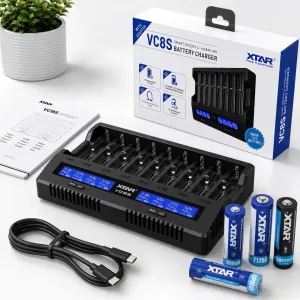
XTAR VC8S: Consider it if you regularly charge several batteries and want more charging slots and additional monitoring features.
XTAR PB2S: Worth considering if you want a charger that can also function as a power bank with compatible batteries.

Who Should Buy the XTAR MC1 Plus?
Flashlight Owners and Security Professionals
If you use a rechargeable flashlight for work, keeping a compatible battery charged is essential. The MC1 Plus provides a compact charging option for users who need to charge one battery between shifts or keep a spare charger in their equipment bag.
Outdoor Enthusiasts
For camping, hiking and other outdoor activities, a small charger can be convenient when paired with a suitable power bank or another compatible 5V USB source. Its compact design makes it easy to pack alongside other equipment.
Travellers and Everyday Users
The MC1 Plus is worth considering if you prefer a simple charger that takes up little storage space. It is particularly useful for people who do not need multiple charging slots or detailed battery diagnostics.
Users With Multiple Rechargeable Devices
If your devices use compatible 3.6V/3.7V cylindrical lithium-ion batteries, the MC1 Plus may help simplify your charging setup. However, always confirm that the battery chemistry and dimensions are supported before use.
Who Should Consider a Different Charger?
The MC1 Plus may not be the best option if:
-
You need to charge two or more batteries at the same time.
-
You regularly use NiMH AA/AAA batteries or other battery chemistries that it does not support.
-
You want to monitor battery voltage, capacity or internal resistance.
-
You prefer a modern USB-C connection.
-
You need a charger with advanced testing functions.
-
You want a charger that doubles as a power bank.
In these cases, consider a multi-slot charger or a model with the additional functions you need.
Final Verdict: Is the XTAR MC1 Plus Worth Buying?
The XTAR MC1 Plus is a practical option for users who prioritise portability and straightforward charging over advanced features. Its small footprint, USB power input and compatibility with several cylindrical lithium-ion battery sizes make it suitable for basic charging needs.
Its main trade-offs are the single charging slot, micro-USB connection and lack of a digital display. If you regularly charge several batteries or want more control over battery analysis, a more advanced XTAR model may offer better long-term value.
Our rating: 4.5/5 for portability and everyday convenience.
For Kenyan flashlight owners and other users of compatible lithium-ion batteries, the MC1 Plus is worth considering if you need a compact charger for one battery at a time. Before buying, confirm that it supports your battery's size, chemistry and voltage.
Frequently Asked Questions
Can the XTAR MC1 Plus charge NiMH AA or AAA batteries?
No. The MC1 Plus is designed for compatible 3.6V/3.7V lithium-ion batteries. It is not intended for conventional 1.2V NiMH AA/AAA batteries or 1.5V constant-voltage lithium AA/AAA cells. Use a charger designed for the specific battery type.
How long does it take to charge an 18650 battery?
Charging time depends on the battery's capacity, starting charge level and selected charging current. A 3000mAh 18650 battery may take several hours to charge fully. Allow additional time as the charging current tapers near full capacity.
Can I power the charger using a power bank or laptop?
Yes, provided the USB source supplies a compatible 5V output and sufficient current. A suitable wall adapter or power bank is also a convenient option when a mains socket is unavailable. Charging performance will depend on the power source.
Is the XTAR MC1 Plus compatible with 21700 and 26650 batteries?
It is specified for a range of cylindrical lithium-ion battery sizes, including 21700 and 26650. However, verify compatibility with your exact battery and charger version before use, especially if the cell has an unusual length or protected design.
Does the XTAR MC1 Plus have USB-C?
No. The MC1 Plus uses a micro-USB input. If USB-C is important to you, consider a compatible XTAR model that supports USB-C charging.
Can I leave the battery charging overnight?
It is best to monitor charging and disconnect the charger when charging is complete. Even when a charger incorporates protection features, avoid leaving charging batteries unattended for long periods. Follow the manufacturer's safety instructions.
Is the XTAR MC1 Plus suitable for rechargeable flashlight batteries?
Yes, it can be suitable for compatible 3.6V/3.7V lithium-ion flashlight batteries. Check the battery size, chemistry and voltage before charging, as not every rechargeable flashlight battery is compatible.
Ready to Choose Your XTAR Battery Charger?
The XTAR MC1 Plus is worth considering if you want a compact, easy-to-use charger for compatible lithium-ion batteries. If you need more charging slots, battery analysis or USB-C connectivity, compare it with XTAR's other charging options before deciding.
Choose a charger that matches your batteries, charging habits and intended use.